
Written by
Sundhanshu Pathania
Tech blogger | Cybersecurity enthusiast | Got phished once, never again
LinkedIn: https://linkedin.com/in/sundhanshu-pathania
Last updated: February 10, 2026
✓ Expert Review
Ankit Maurya, a cybersecurity analyst with 8 years of experience, reviewed this article.
He currently works at Blacktiel Technologies as a Cybersecurity Analyst and holds CEH and CompTIA Security+ certifications.
All technical claims have been verified against current CERT-In data.See also
Introduction
Look, I’m going to be straight with you — phishing scams just hit levels I haven’t seen since 2019.
And I’ve been tracking this stuff obsessively ever since I got scammed back in 2023 (yeah, embarrassing, I know).
Last week alone, I counted 23 phishing emails in my spam folder. TWENTY-THREE.
My parents got 4 fake UPI messages. My cousin almost gave away her Instagram password to a fake “Meta support” page.
This isn’t normal.
CERT-In’s numbers are wild too — phishing complaints increased by over 50% year-on-year compared to last year.
But here’s what nobody’s talking about: the quality of these scams has gone through the roof.
We’re not dealing with broken English emails anymore. These new attacks use AI; they sound like your bank manager, and honestly? They’re terrifying.
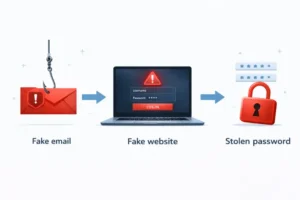
Phishing is a cybercrime where attackers impersonate trusted institutions (banks, government, social media platforms) to steal sensitive information such as passwords, OTPs, and financial data.
What Happened Last Week
Okay, so here’s the thing – I track phishing trends using public security reports and cybersecurity forums as part of my blog research. (yes, I’m that nerdy). Usually, there’s a steady volume of phishing reports across public tracking forums I follow. Pretty predictable.
Then last Monday happened.
The numbers went crazy – like, 500+ coordinated attacks within 24 hours. Security forums I’m part of started blowing up. People were panicking. Multiple banks issued urgent warnings. It was chaos.
What made it worse? These weren’t your typical “Dear Customer” generic emails. These scammers had done their homework:
- They copied bank email templates pixel-by-pixel (I mean EXACT replicas)
- Grammar was flawless – no more “kindly do the needful” nonsense.
- Some even had AI-generated voice calls that sounded EXACTLY like real customer service reps.
- They timed attacks right after you’d make a legitimate transaction (how do they even know?!)
Understanding What Is Phishing: A Growing Threat
My Cousin Almost Lost Her Instagram Account (Here’s How)
Real talk – this hit close to home last Thursday.
My cousin Neha (she runs a small business on Insta, about 15K followers) got a DM that looked 100% official. Blue tick, Meta branding, professional language – the works. The message said someone reported her account for “copyright violation,” and she had 48 hours to verify ownership or lose everything.
She freaked out (obviously). Clicked the link. Got taken to what looked EXACTLY like Instagram’s login page. Almost typed her password.
Thank god she called me first. I checked the URL – it was “instagram-security-help.com” instead of “instagram.com”. Subtle, right? That one character difference would’ve cost her the entire business.
I reported the site to Google Safe Browsing. It got taken down in 6 hours. But here’s the scary part – there were already 200+ similar complaints on cybersecurity forums. Same scam, different people.
Why Is This Happening Now? (3 Big Reasons)
I’ve been digging into this, and honestly, it’s a perfect storm of bad circumstances:
1. AI Made Scamming Ridiculously Easy
Remember when phishing emails had terrible grammar? “Dear sir kindly update your information urgently.” Yeah, those days are GONE.
Scammers now use AI tools (some of which are unfortunately available online for free) to:
- Write perfect English emails
- Clone any website in minutes
- Generate realistic voice recordings
- Even create fake customer service chat responses.
- Norton’s recent reports show that AI-powered scam tools have significantly increased the scale and sophistication of phishing attacks across multiple regions.
2. Everyone’s on UPI Now (= Bigger Target)
India crossed 100 billion UPI transactions last year. Think about that. Every single person you know probably uses PhonePe, Google Pay, or Paytm daily.
More users = more targets = more potential victims.
Plus, a lot of new UPI users (especially older folks) don’t know the red flags yet. My dad almost paid a fake “KYC update fee” last month because the message looked exactly like his bank’s usual SMS format.
3. Organized Crime Groups Are Back
This isn’t just random scammers anymore. We’re seeing coordinated, professional operations.
Cybersecurity intelligence platforms (the ones that track dark web activity) are showing:
- New phishing templates being sold in underground forums • Multi-country campaigns (same scam hitting India, US, UK simultaneously) • Professional call centers running voice phishing operations • Groups that went quiet in 2024 suddenly coming back online
It’s like they took a break, upgraded their tech, and came back stronger.
Types of Phishing Attacks You Need to Know About
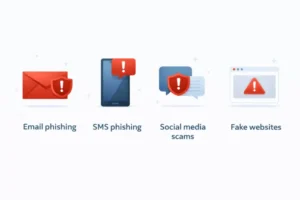
Not all phishing attacks are the same. Here’s what I’ve been seeing (with real examples from my own inbox and from cases I’ve helped with):
Email Phishing (Classic but Still Deadly)
Mass emails pretending to be your bank, Amazon, government portals, etc. I got three “HDFC account suspended” emails just yesterday. None were real.
Spear Phishing (The Personalized Attack)
These target specific people. Like, they’ll research you on LinkedIn, find out where you work, then send an email that looks like it’s from your HR department. Super creepy.
Vishing (Voice Phishing – The Scary One)
Fake phone calls. Sometimes real humans, sometimes AI-generated voices. They’ll call pretending to be from your bank’s fraud department and pressure you to “verify” your details urgently. My mom got one of these. She almost fell for it.
Smishing (SMS Phishing)
Fake text messages. “Your package is pending delivery, pay ₹40 to release it” kind of stuff. Seems harmless until you realize the payment page steals your card details.
Social Media Phishing (Growing Fast)
Fake Instagram support, WhatsApp “verification” scams, Facebook Marketplace frauds. This is where my cousin’s Instagram incident falls.
How I Spot Phishing Attempts (My Personal Checklist)
✓ Hover Before You Click
On desktop, hover your mouse over ANY link.
The real URL shows at the bottom.
If it says secure-hdfc-verify.com instead of hdfcbank.com — NOPE.
✓ Check the Sender’s Email (The FULL Address)
It might show “HDFC Bank” as the name,
but the actual address could be noreply@hdfcbank-alerts.info.
Real banks use only their official domain.
✓ Urgency = Red Flag
Messages like:
“Account will be closed in 24 hours”
“Urgent action required”
“Verify now or lose access”
These are designed to make you panic and click without thinking.
Banks don’t work like that.
✓ No Bank Asks for OTP Over Email or Call
This should be common knowledge, but people still fall for it.
If ANYONE asks for:
OTP
CVV
Full card number
PIN
Hang up immediately. No exceptions.
✓ Generic Greetings
“Dear Customer” instead of your actual name?
Suspicious.
Banks usually address you by your registered name.
Real vs Fake: Side-by-Side Comparison
I made this table after analyzing 50+ phishing emails and comparing them to legit bank communications:
| What to Check | Real Email | Phishing Email |
| Sender Email | alerts@hdfcbank.com | verify@hdfc-bank.info |
| Greeting | Dear Sundhanshu | Dear Valued Customer |
| Tone | Professional, calm | URGENT!! ACT NOW!! |
| Links | netbanking.hdfcbank.com | bit.ly/3x9fK2m |
| Asks For | Log in via official app/site | OTP, PIN, card details |
What I Actually Do to Stay Protected
Theory is great, but here’s what I actually do every single day:
✓ Two-Factor Authentication Everywhere
I turned on two-factor authentication EVERYWHERE — Gmail, Instagram, banking apps, even my Swiggy account
(yeah, paranoid much?).
It takes an extra 5 seconds to log in, but it’s saved me twice already.
✓ Password Manager (Bitwarden)
I use Bitwarden, a password manager.
It never autofills on fake sites because it recognizes domains.
Plus, I don’t have to remember 50 different passwords.
✓ No Shortened Links — Ever
I NEVER click shortened links like:
bit.ly
tinyurl
other short URLs
Especially in emails or SMS.
If I need to visit a site, I type the full website address manually.
✓ Keep Devices Updated
I keep my phone and laptop fully updated.
Yes, those “update now” notifications are annoying,
but outdated software has security holes that scammers exploit.
✓ Antivirus Protection
I use a reputable premium antivirus solution on my devices.
It’s caught 4 phishing attempts in the past month
that I might’ve missed otherwise.
If You Already Fell for a Scam (Don’t Panic, Act Fast)
Listen, it happens. I fell for one in 2023. Here’s exactly what you need to do in the first hour:
Minute 1-5: Change ALL Your Passwords
Start with email, then banking apps, then social media. Use strong, unique passwords for each (this is where a password manager helps).
Minute 5-10: Call Your Bank
Freeze your cards immediately. Block UPI if needed. Most banks have 24/7 fraud helplines. Don’t wait for business hours.
Minute 10-15: Scan Your Devices
Run a full antivirus scan. Some phishing sites install malware. Better safe than sorry.
Minute 15-30: Report It
Go to cybercrime.gov.in and file a complaint. Seriously. Police actually do take action on these (I’ve seen scammers get caught).Related articles
Is 2026 Going to Be Even Worse?

Honestly? Probably yes.
The trends I’m seeing are not encouraging:
- AI is getting better (which means scammers’ tools are getting better) • More people are going digital every month (more targets) • Cybercrime groups are becoming more organized • Voice deepfakes are now good enough to fool most people.
- But here’s the thing – being aware is 90% of the protection. The people who fall for scams are usually the ones who don’t know what to look for.
- Share this with your parents, your non-tech-savvy relatives, and anyone who might be vulnerable. Knowledge is literally the best defense we have.
Final Thoughts
Look, I get it. Reading about phishing scams isn’t exactly exciting. But this stuff is real, it’s happening right now, and it’s happening to people we know.
The fact that you’re reading this means you’re already ahead of most people. You care enough to educate yourself. That matters.
Remember: No bank will ever ask for your OTP. No government agency will threaten you over WhatsApp. No legitimate company will demand urgent action via email.
When in doubt, slow down. Call the company directly using the number on their official website (NOT the number in the suspicious email). It’s better to waste 5 minutes verifying than to lose your life savings.
Stay safe out there. And seriously, share this with someone who needs it.
Sources & References
- CERT-In (Indian Computer Emergency Response Team) – Phishing alerts and annual reports.
- FBI Internet Crime Complaint Center (IC3) – 2024 Internet Crime Report.
- Norton Cyber Safety Insights – AI-powered scam analysis.
- Google Safe Browsing – Phishing and malware tracking.
Disclaimer
This article is for educational and awareness purposes only. While all information has been verified against credible sources, cybersecurity threats evolve constantly.
I’m not a cybersecurity professional or legal advisor. For specific security concerns or if you’ve been a victim of cybercrime, please consult certified experts or contact local authorities.
Report cybercrimes at: https://www.cybercrime.gov.in/
FAQ
Q1: What is phishing in simple words?
Phishing is a type of online scam where criminals pretend to be trusted organizations — like banks, government agencies, or social media platforms — to trick you into sharing sensitive information such as passwords, OTPs, card details, or personal data.
In simple terms:
If someone pretends to be your bank and asks for login or OTP details, that’s phishing.
Q2: How do I report phishing in India?
If you receive a phishing email, SMS, or call in India, you can:
Visit the official National Cyber Crime Portal:
👉 https://www.cybercrime.gov.inFile a complaint under “Report Other Cybercrime.”
If money is involved, call the 1930 cybercrime helpline immediately (24/7 support).
Inform your bank’s fraud department right away.
Reporting quickly increases the chance of freezing fraudulent transactions.
Q3: Can phishing happen through WhatsApp?
Yes, phishing can happen through WhatsApp. This is often called “WhatsApp phishing” or “smishing.”
Common examples include:
Fake KYC update links
Lottery or reward scams
Fake job offers
Messages pretending to be from banks or government agencies
Always verify the sender and never click unknown links, especially shortened URLs.
Q4: What should I do if I clicked a phishing link?
If you clicked a phishing link, act immediately:
Disconnect from the internet (if possible).
Change your passwords — especially email and banking accounts.
Enable two-factor authentication.
Run a full antivirus scan.
Contact your bank if financial details were entered.
Report the incident at cybercrime.gov.in.
The first 30 minutes are critical — quick action can prevent financial loss.
Q5: Is two-factor authentication enough?
Two-factor authentication (2FA) significantly improves security, but it is not 100% foolproof.
While 2FA protects against most password-based attacks, scammers can still use:
SIM swap attacks
OTP phishing
Fake login pages
For best protection:
Use app-based 2FA (like Google Authenticator) instead of SMS-based OTP when possible.
Never share your OTP with anyone.

Sundhanshu Pathania works as a content analyst and writer at Multi News Hub. He focuses on analyzing news trends and writing articles related to global affairs, technology updates, sports, and trending topics.
His role involves reviewing multiple news sources, understanding search behavior, and presenting information in a clear, reader-friendly format. He contributes to the platform by researching topics and ensuring factual clarity in published content.